> ## Documentation Index
> Fetch the complete documentation index at: https://docs-staging-update-unified-phone-experience-doc.mintlify.site/llms.txt
> Use this file to discover all available pages before exploring further.

# Variables et fonctions utilitaires

> Apprenez à utiliser les variables dans les Formulaires pour les Actions.

Les variables vous permettent d’accéder aux données contenues dans les Formulaires et les Flux pour créer une logique commerciale et des automatismes personnalisés.

Voici quelques considérations de base sur l’utilisation des variables :

* Les variables sont entourées d’accolades `{{ variable }}`.
* Si une variable n’existe pas ou ne peut pas être résolue, elle a le même effet qu’une variable dont la valeur est `undefined (indéfini)`.
* Vous pouvez utiliser des opérateurs nuls pour gérer les variables dont la valeur est `null` ou `undefined`, par exemple :`{{fields.foo ?? fields.bar}}`.

## Variables disponibles

Vous pouvez utiliser différents types de variables pour référencer et transformer les données que vous recueillez auprès des clients avec les Formulaires et les Flux.

| Variable                   | \_Syntax          | Where              | Description                                                                  |
| -------------------------- | ----------------- | ------------------ | ---------------------------------------------------------------------------- |
| Contexte                   | `{{contexte.*}}`  | Formes / Flux      | Données contextuelles de référence de la transaction en cours                |
| Champs de formulaire       | `{{fields. *}}`   | Formulaires / Flux | Données de référence des champs de votre formulaire et des champs cachés     |
| Variables partagées        | `{{vars.*}}`      | Formulaires / Flux | Données de référence stockées en tant que variables partagées                |
| Sortie des actions de flux | `{{actions. *}}`  | Flux               | Données de référence de la réponse de sortie des actions de flux précédentes |
| Fonctions d’aide           | `{{fonctions.*}}` | Formulaires / Flux | Fonctions d’aide pour transformer les données                                |

### Variables de contexte

Les Formulaires et les Flux héritent automatiquement des variables de contexte de la transaction en cours. Vous pouvez accéder aux variables de contexte suivantes :

* L’objet `user`, avec accès aux propriétés suivantes :

  * `user.user_id`
  * `user.username`
  * `user.name`
  * `user.given_name`
  * `user.family_name`
  * `user.nickname`
  * `user.email`
  * `user.email_verified`
  * `user.phone_number`
  * `user.phone_verified`
  * `user.picture`
  * `user.user_metadata`
  * `user.app_metadata`
  * `user.created_at`
  * `user.updated_at`
  * `user.last_password_reset`
  * `user.identities`
* L’objet `organization`, avec accès aux propriétés suivantes :

  * `organization.id`
  * `organization.name`
  * `organization.display_name`
  * `organization.metadata`
* L’objet `client`, avec accès aux propriétés suivantes :

  * `client.client_id`
  * `client.name`
* L’objet `tenant (locataire)`, avec accès à la propriété suivante :

  * `tenant.name`
* L’objet `transaction`, avec accès à la propriété suivante :

  * `transaction.state`

<Accordion title="Exemple d’objet contextuel">
  ```json lines theme={null}
  {
    "user": {
      "user_id": "auth0|658409...",
      "name": "ana@travel0.com",
      "nickname": "ana",
      "email": "ana@travel0.com",
      "email_verified": true,
      "picture": "https://s.gravatar.com/avatar/8eb1b522f6...",
      "user_metadata": {},
      "app_metadata": {},
      "created_at": "2023-12-21T09:46:40.487Z",
      "updated_at": "2024-05-07T10:44:26.271Z",
      "last_password_reset": "2023-12-21T09:49:08.932Z",
      "identities": [
        {
          "user_id": "6584...",
          "isSocial": false,
          "provider": "auth0",
          "connection": "Username-Password-Authentication"
        }
      ]
    },
    "client": {
      "client_id": "xpeg5...",
      "name": "My App"
    },
    "tenant": {
      "name": "tenant-testing"
    },
    "transaction": {
      "state": "hKFo2SBId2M0..."
    }
  }
  ```
</Accordion>

Par exemple :  `{{context.user.user_id}}` référence `user_id` de l’objet `user`.

<Frame>
  <img src="https://mintcdn.com/docs-staging-update-unified-phone-experience-doc/xVmHC1blPjlyxfV2/docs/images/fr-ca/cdy7uua7fh8z/3B8DRhXO2wGqeqSFb8KbQv/0a61cdbbb7f1d290950a2ddb9857aac3/Contex-variable.png?fit=max&auto=format&n=xVmHC1blPjlyxfV2&q=85&s=c9dd6a392cd50d9a1b23bead3ff5f2c0" alt="Dashboard > Forms > Flows" data-og-width="1141" width="1141" data-og-height="219" height="219" data-path="docs/images/fr-ca/cdy7uua7fh8z/3B8DRhXO2wGqeqSFb8KbQv/0a61cdbbb7f1d290950a2ddb9857aac3/Contex-variable.png" data-optimize="true" data-opv="3" srcset="https://mintcdn.com/docs-staging-update-unified-phone-experience-doc/xVmHC1blPjlyxfV2/docs/images/fr-ca/cdy7uua7fh8z/3B8DRhXO2wGqeqSFb8KbQv/0a61cdbbb7f1d290950a2ddb9857aac3/Contex-variable.png?w=280&fit=max&auto=format&n=xVmHC1blPjlyxfV2&q=85&s=0d85407c00578d3fef7272e6a4677387 280w, https://mintcdn.com/docs-staging-update-unified-phone-experience-doc/xVmHC1blPjlyxfV2/docs/images/fr-ca/cdy7uua7fh8z/3B8DRhXO2wGqeqSFb8KbQv/0a61cdbbb7f1d290950a2ddb9857aac3/Contex-variable.png?w=560&fit=max&auto=format&n=xVmHC1blPjlyxfV2&q=85&s=3f84c2e8690b810a1c4d526504d29ac7 560w, https://mintcdn.com/docs-staging-update-unified-phone-experience-doc/xVmHC1blPjlyxfV2/docs/images/fr-ca/cdy7uua7fh8z/3B8DRhXO2wGqeqSFb8KbQv/0a61cdbbb7f1d290950a2ddb9857aac3/Contex-variable.png?w=840&fit=max&auto=format&n=xVmHC1blPjlyxfV2&q=85&s=5435744d18f812a8bd7aa4708ce6de80 840w, https://mintcdn.com/docs-staging-update-unified-phone-experience-doc/xVmHC1blPjlyxfV2/docs/images/fr-ca/cdy7uua7fh8z/3B8DRhXO2wGqeqSFb8KbQv/0a61cdbbb7f1d290950a2ddb9857aac3/Contex-variable.png?w=1100&fit=max&auto=format&n=xVmHC1blPjlyxfV2&q=85&s=bce8ae490b31d25a287507084254dc7f 1100w, https://mintcdn.com/docs-staging-update-unified-phone-experience-doc/xVmHC1blPjlyxfV2/docs/images/fr-ca/cdy7uua7fh8z/3B8DRhXO2wGqeqSFb8KbQv/0a61cdbbb7f1d290950a2ddb9857aac3/Contex-variable.png?w=1650&fit=max&auto=format&n=xVmHC1blPjlyxfV2&q=85&s=dcc3718a2f3706773f9b1f4044d7361c 1650w, https://mintcdn.com/docs-staging-update-unified-phone-experience-doc/xVmHC1blPjlyxfV2/docs/images/fr-ca/cdy7uua7fh8z/3B8DRhXO2wGqeqSFb8KbQv/0a61cdbbb7f1d290950a2ddb9857aac3/Contex-variable.png?w=2500&fit=max&auto=format&n=xVmHC1blPjlyxfV2&q=85&s=d9aaf2bf8198271b338a9262b5a59efe 2500w" />
</Frame>

### Variables des champs du formulaire

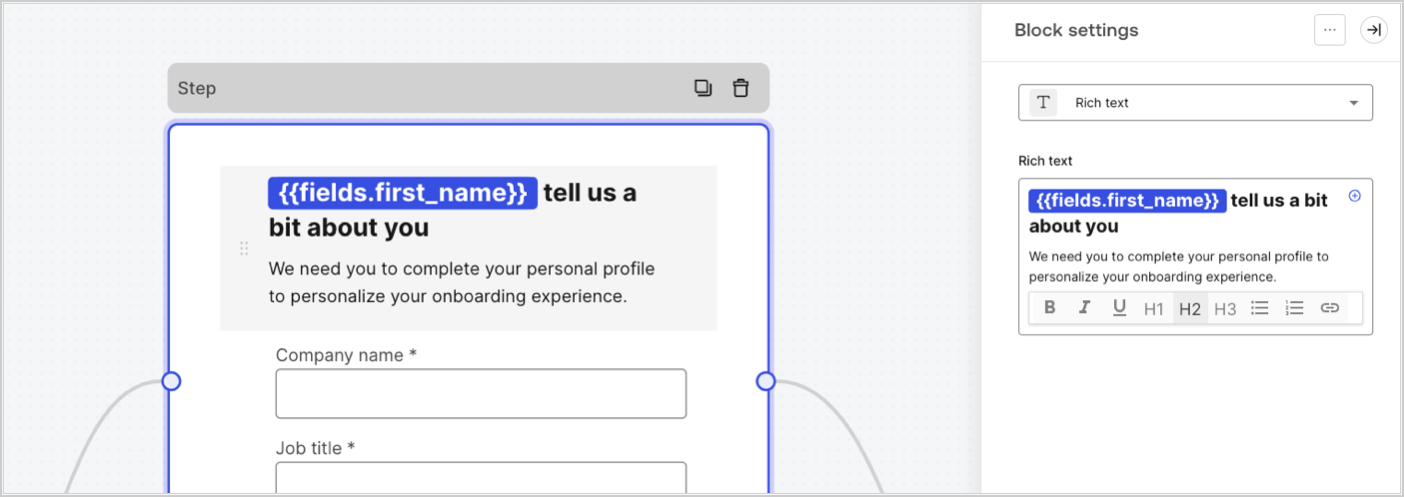
Les variables de champ contiennent les données recueillies auprès de l’utilisateur dans les champs de saisie du formulaire et les données des champs cachés. Les données de chaque champ varient en fonction du type de champ. Par exemple : `{{fields.first_name}}` référence la valeur saisie dans le champ ayant l’ID `first_name`.
<Frame>
  <img src="https://mintcdn.com/docs-staging-update-unified-phone-experience-doc/YZGor5mogQUTojyA/docs/images/fr-ca/cdy7uua7fh8z/4D42A6ww4XvFxweoxh04Rd/016c2ed9d25bc2267ed3ed31bf8b2bf6/form-fields-variable.png?fit=max&auto=format&n=YZGor5mogQUTojyA&q=85&s=f87a2645e4eb0cce2bb1cecdbae159cc" alt="Dashboard > Actions > Forms > Form" data-og-width="1404" width="1404" data-og-height="497" height="497" data-path="docs/images/fr-ca/cdy7uua7fh8z/4D42A6ww4XvFxweoxh04Rd/016c2ed9d25bc2267ed3ed31bf8b2bf6/form-fields-variable.png" data-optimize="true" data-opv="3" srcset="https://mintcdn.com/docs-staging-update-unified-phone-experience-doc/YZGor5mogQUTojyA/docs/images/fr-ca/cdy7uua7fh8z/4D42A6ww4XvFxweoxh04Rd/016c2ed9d25bc2267ed3ed31bf8b2bf6/form-fields-variable.png?w=280&fit=max&auto=format&n=YZGor5mogQUTojyA&q=85&s=d3388420d818237b68652860c16848ea 280w, https://mintcdn.com/docs-staging-update-unified-phone-experience-doc/YZGor5mogQUTojyA/docs/images/fr-ca/cdy7uua7fh8z/4D42A6ww4XvFxweoxh04Rd/016c2ed9d25bc2267ed3ed31bf8b2bf6/form-fields-variable.png?w=560&fit=max&auto=format&n=YZGor5mogQUTojyA&q=85&s=c60efae2d59af881d96c49b3dd002916 560w, https://mintcdn.com/docs-staging-update-unified-phone-experience-doc/YZGor5mogQUTojyA/docs/images/fr-ca/cdy7uua7fh8z/4D42A6ww4XvFxweoxh04Rd/016c2ed9d25bc2267ed3ed31bf8b2bf6/form-fields-variable.png?w=840&fit=max&auto=format&n=YZGor5mogQUTojyA&q=85&s=b307eb539e1b91644dda5538cca86747 840w, https://mintcdn.com/docs-staging-update-unified-phone-experience-doc/YZGor5mogQUTojyA/docs/images/fr-ca/cdy7uua7fh8z/4D42A6ww4XvFxweoxh04Rd/016c2ed9d25bc2267ed3ed31bf8b2bf6/form-fields-variable.png?w=1100&fit=max&auto=format&n=YZGor5mogQUTojyA&q=85&s=f2bb8c1a91284e16eca172fd2fe8a891 1100w, https://mintcdn.com/docs-staging-update-unified-phone-experience-doc/YZGor5mogQUTojyA/docs/images/fr-ca/cdy7uua7fh8z/4D42A6ww4XvFxweoxh04Rd/016c2ed9d25bc2267ed3ed31bf8b2bf6/form-fields-variable.png?w=1650&fit=max&auto=format&n=YZGor5mogQUTojyA&q=85&s=b7034281bad7fc8433f262a58435a565 1650w, https://mintcdn.com/docs-staging-update-unified-phone-experience-doc/YZGor5mogQUTojyA/docs/images/fr-ca/cdy7uua7fh8z/4D42A6ww4XvFxweoxh04Rd/016c2ed9d25bc2267ed3ed31bf8b2bf6/form-fields-variable.png?w=2500&fit=max&auto=format&n=YZGor5mogQUTojyA&q=85&s=50a293521de1c7fd87b6938155797fd3 2500w" />
</Frame>

### Variables des actions de sortie de flux

Lorsqu’une action de flux est exécutée, elle génère un objet qui peut être référencé dans les actions suivantes. Par exemple : `{{actions.generate_otp.code}}` référence le code résultant de l’action avec l’ID`generate_otp`.

<Frame>
  <img src="https://mintcdn.com/docs-staging-update-unified-phone-experience-doc/sGShoIm6fao3ufGw/docs/images/fr-ca/cdy7uua7fh8z/6jYtEdYqSGXm3DDv0mxQ0o/2d48012629745e07137bf6ba42f4d829/flow-output-variable.png?fit=max&auto=format&n=sGShoIm6fao3ufGw&q=85&s=c6508dc158c0cfcb81e7a19af4835841" alt="Dashboard > Actions > Forms > Flows" data-og-width="1404" width="1404" data-og-height="253" height="253" data-path="docs/images/fr-ca/cdy7uua7fh8z/6jYtEdYqSGXm3DDv0mxQ0o/2d48012629745e07137bf6ba42f4d829/flow-output-variable.png" data-optimize="true" data-opv="3" srcset="https://mintcdn.com/docs-staging-update-unified-phone-experience-doc/sGShoIm6fao3ufGw/docs/images/fr-ca/cdy7uua7fh8z/6jYtEdYqSGXm3DDv0mxQ0o/2d48012629745e07137bf6ba42f4d829/flow-output-variable.png?w=280&fit=max&auto=format&n=sGShoIm6fao3ufGw&q=85&s=ff7ceb39522b8ccc9fb158f380c9c005 280w, https://mintcdn.com/docs-staging-update-unified-phone-experience-doc/sGShoIm6fao3ufGw/docs/images/fr-ca/cdy7uua7fh8z/6jYtEdYqSGXm3DDv0mxQ0o/2d48012629745e07137bf6ba42f4d829/flow-output-variable.png?w=560&fit=max&auto=format&n=sGShoIm6fao3ufGw&q=85&s=986b6ee450935816ca53138e96c26907 560w, https://mintcdn.com/docs-staging-update-unified-phone-experience-doc/sGShoIm6fao3ufGw/docs/images/fr-ca/cdy7uua7fh8z/6jYtEdYqSGXm3DDv0mxQ0o/2d48012629745e07137bf6ba42f4d829/flow-output-variable.png?w=840&fit=max&auto=format&n=sGShoIm6fao3ufGw&q=85&s=e4efc62b638fe9ad15c775a85e303ef4 840w, https://mintcdn.com/docs-staging-update-unified-phone-experience-doc/sGShoIm6fao3ufGw/docs/images/fr-ca/cdy7uua7fh8z/6jYtEdYqSGXm3DDv0mxQ0o/2d48012629745e07137bf6ba42f4d829/flow-output-variable.png?w=1100&fit=max&auto=format&n=sGShoIm6fao3ufGw&q=85&s=903845569a15e0486b1b1ccaca1a0d24 1100w, https://mintcdn.com/docs-staging-update-unified-phone-experience-doc/sGShoIm6fao3ufGw/docs/images/fr-ca/cdy7uua7fh8z/6jYtEdYqSGXm3DDv0mxQ0o/2d48012629745e07137bf6ba42f4d829/flow-output-variable.png?w=1650&fit=max&auto=format&n=sGShoIm6fao3ufGw&q=85&s=6ce2c31bedfcbaf08ae750f6524a69fb 1650w, https://mintcdn.com/docs-staging-update-unified-phone-experience-doc/sGShoIm6fao3ufGw/docs/images/fr-ca/cdy7uua7fh8z/6jYtEdYqSGXm3DDv0mxQ0o/2d48012629745e07137bf6ba42f4d829/flow-output-variable.png?w=2500&fit=max&auto=format&n=sGShoIm6fao3ufGw&q=85&s=5f25ac94e9bccab02df3ad7d51939c6e 2500w" />
</Frame>

### Variables partagées

Vous pouvez stocker des variables à partager avec des flux ultérieurs ou même avec des composants de formulaire dans la même transaction. Les variables partagées sont éphémères et sont associées à un parcours de formulaire spécifique. Leurs valeurs ne sont pas accessibles en dehors de ce parcours. Par exemple : `{{vars.external_id}}` référence la valeur d’une variable partagée avec l’ID `external_id`.

<Frame>
  <img src="https://mintcdn.com/docs-staging-update-unified-phone-experience-doc/YZGor5mogQUTojyA/docs/images/fr-ca/cdy7uua7fh8z/4571ExRTHL0KZKJKX9pNwj/abb631b8608a6356b0e5b3784cf8b02f/flow-shared-variable.png?fit=max&auto=format&n=YZGor5mogQUTojyA&q=85&s=e37047c4f2a794ab43236778a3e264aa" alt="Dashboard > Actions > Forms > Flows" data-og-width="1215" width="1215" data-og-height="162" height="162" data-path="docs/images/fr-ca/cdy7uua7fh8z/4571ExRTHL0KZKJKX9pNwj/abb631b8608a6356b0e5b3784cf8b02f/flow-shared-variable.png" data-optimize="true" data-opv="3" srcset="https://mintcdn.com/docs-staging-update-unified-phone-experience-doc/YZGor5mogQUTojyA/docs/images/fr-ca/cdy7uua7fh8z/4571ExRTHL0KZKJKX9pNwj/abb631b8608a6356b0e5b3784cf8b02f/flow-shared-variable.png?w=280&fit=max&auto=format&n=YZGor5mogQUTojyA&q=85&s=5569d5db79d34056d24b7e998c3a5d0c 280w, https://mintcdn.com/docs-staging-update-unified-phone-experience-doc/YZGor5mogQUTojyA/docs/images/fr-ca/cdy7uua7fh8z/4571ExRTHL0KZKJKX9pNwj/abb631b8608a6356b0e5b3784cf8b02f/flow-shared-variable.png?w=560&fit=max&auto=format&n=YZGor5mogQUTojyA&q=85&s=add68494981ac43937356e000c90e910 560w, https://mintcdn.com/docs-staging-update-unified-phone-experience-doc/YZGor5mogQUTojyA/docs/images/fr-ca/cdy7uua7fh8z/4571ExRTHL0KZKJKX9pNwj/abb631b8608a6356b0e5b3784cf8b02f/flow-shared-variable.png?w=840&fit=max&auto=format&n=YZGor5mogQUTojyA&q=85&s=34e788136b91ad3de9af495e5bf211d1 840w, https://mintcdn.com/docs-staging-update-unified-phone-experience-doc/YZGor5mogQUTojyA/docs/images/fr-ca/cdy7uua7fh8z/4571ExRTHL0KZKJKX9pNwj/abb631b8608a6356b0e5b3784cf8b02f/flow-shared-variable.png?w=1100&fit=max&auto=format&n=YZGor5mogQUTojyA&q=85&s=cdc6640af53bc05c4093ec1b5501d111 1100w, https://mintcdn.com/docs-staging-update-unified-phone-experience-doc/YZGor5mogQUTojyA/docs/images/fr-ca/cdy7uua7fh8z/4571ExRTHL0KZKJKX9pNwj/abb631b8608a6356b0e5b3784cf8b02f/flow-shared-variable.png?w=1650&fit=max&auto=format&n=YZGor5mogQUTojyA&q=85&s=2407d0d6c94f15b3ccfe7bedeb15b169 1650w, https://mintcdn.com/docs-staging-update-unified-phone-experience-doc/YZGor5mogQUTojyA/docs/images/fr-ca/cdy7uua7fh8z/4571ExRTHL0KZKJKX9pNwj/abb631b8608a6356b0e5b3784cf8b02f/flow-shared-variable.png?w=2500&fit=max&auto=format&n=YZGor5mogQUTojyA&q=85&s=4ec9e8861cec98d6051d28ca60a5d377 2500w" />
</Frame>

<Warning>
  Variables partagées :

  * elles sont internes (côté serveur) et ne sont pas exposées au navigateur (côté client).
  * elle peuvent être résolues et exposées au navigateur si vous avez référencé une variable partagée dans le composant de formulaire.
</Warning>

### Fonctions utilitaires

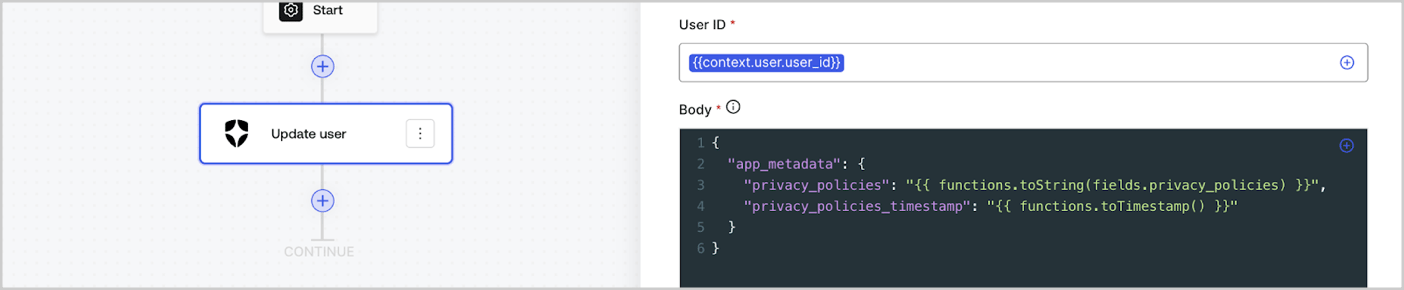
Les fonctions utilitaires permettent de transformer les données et d’effectuer des opérations simples. Par exemple : `{{functions.toString(fields.privacy_policies)}}` transforme la valeur du champ ayant l’ID `privacy_policies` utilisant la fonction `toString()`.
<Frame>
  <img src="https://mintcdn.com/docs-staging-update-unified-phone-experience-doc/-JtZgKEfjHsNR_5e/docs/images/fr-ca/cdy7uua7fh8z/1gyox33XJEtdkT43NppblT/0e878cc5ae2bde11b4207e105bbac6c5/flow-helper-functions.png?fit=max&auto=format&n=-JtZgKEfjHsNR_5e&q=85&s=acd421286793644928799b50ec46ea32" alt="Dashboard > Actions > Forms > Flows" data-og-width="1404" width="1404" data-og-height="290" height="290" data-path="docs/images/fr-ca/cdy7uua7fh8z/1gyox33XJEtdkT43NppblT/0e878cc5ae2bde11b4207e105bbac6c5/flow-helper-functions.png" data-optimize="true" data-opv="3" srcset="https://mintcdn.com/docs-staging-update-unified-phone-experience-doc/-JtZgKEfjHsNR_5e/docs/images/fr-ca/cdy7uua7fh8z/1gyox33XJEtdkT43NppblT/0e878cc5ae2bde11b4207e105bbac6c5/flow-helper-functions.png?w=280&fit=max&auto=format&n=-JtZgKEfjHsNR_5e&q=85&s=1b35318623043c927c014dfb2c52d29a 280w, https://mintcdn.com/docs-staging-update-unified-phone-experience-doc/-JtZgKEfjHsNR_5e/docs/images/fr-ca/cdy7uua7fh8z/1gyox33XJEtdkT43NppblT/0e878cc5ae2bde11b4207e105bbac6c5/flow-helper-functions.png?w=560&fit=max&auto=format&n=-JtZgKEfjHsNR_5e&q=85&s=1d3a5014fde0832b400c62d077f0f877 560w, https://mintcdn.com/docs-staging-update-unified-phone-experience-doc/-JtZgKEfjHsNR_5e/docs/images/fr-ca/cdy7uua7fh8z/1gyox33XJEtdkT43NppblT/0e878cc5ae2bde11b4207e105bbac6c5/flow-helper-functions.png?w=840&fit=max&auto=format&n=-JtZgKEfjHsNR_5e&q=85&s=c910c3a7d46349519c9d2ad57fd2f957 840w, https://mintcdn.com/docs-staging-update-unified-phone-experience-doc/-JtZgKEfjHsNR_5e/docs/images/fr-ca/cdy7uua7fh8z/1gyox33XJEtdkT43NppblT/0e878cc5ae2bde11b4207e105bbac6c5/flow-helper-functions.png?w=1100&fit=max&auto=format&n=-JtZgKEfjHsNR_5e&q=85&s=d538e0fb40bd8c8684e00767b1ec4d3c 1100w, https://mintcdn.com/docs-staging-update-unified-phone-experience-doc/-JtZgKEfjHsNR_5e/docs/images/fr-ca/cdy7uua7fh8z/1gyox33XJEtdkT43NppblT/0e878cc5ae2bde11b4207e105bbac6c5/flow-helper-functions.png?w=1650&fit=max&auto=format&n=-JtZgKEfjHsNR_5e&q=85&s=6dd8be597a6b9af0dbd23977418c0752 1650w, https://mintcdn.com/docs-staging-update-unified-phone-experience-doc/-JtZgKEfjHsNR_5e/docs/images/fr-ca/cdy7uua7fh8z/1gyox33XJEtdkT43NppblT/0e878cc5ae2bde11b4207e105bbac6c5/flow-helper-functions.png?w=2500&fit=max&auto=format&n=-JtZgKEfjHsNR_5e&q=85&s=63e67eccdb1bb7eceff5c2e5fe773afd 2500w" />
</Frame>

Les fonctions utilitaires disponibles sont les suivantes :

| Fonction                               | Description                                                                                                                                                                                                                                                                                   | Exemple                                                                                                          |
| -------------------------------------- | --------------------------------------------------------------------------------------------------------------------------------------------------------------------------------------------------------------------------------------------------------------------------------------------- | ---------------------------------------------------------------------------------------------------------------- |
| toArray(value)                         | Convertit la valeur en un tableau                                                                                                                                                                                                                                                             | {"{{ functions.toArray('abc') }}"} // \['abc']                                                                   |
| toBoolean(value)                       | Convertit la valeur en valeur booléenne                                                                                                                                                                                                                                                       | {"{{ functions.toBoolean(1) }}"} // true<br /><br />{"{{ functions.toBoolean(0) }}"} // false                    |
| length(value)                          | Renvoie la longueur de la valeur du paramètre                                                                                                                                                                                                                                                 | {"{{ functions.length('auth0') }}"} // 5                                                                         |
| mask(value)                            | Masque une valeur pour éviter l’exposition dans les exécutions                                                                                                                                                                                                                                | {"{{ functions.mask('my_awesome_secret') }}"} // ███                                                             |
| toNumber(value)                        | Convertit la valeur en nombre                                                                                                                                                                                                                                                                 | {"{{ functions.toNumber('123') }}"} // 123                                                                       |
| random(min, max, \[boolean])           | Renvoie un nombre aléatoire compris entre les valeurs minimales et maximales incluses.                                                                                                                                                                                                        | {"{{ functions.random(0, 6) }}"} // 4<br /><br />{"{{ functions.random(0, 6, true) }}"} // 3.8523497...          |
| slice(value, start, end)               | Renvoie une section d’un tableau de valeurs ou d’une chaîne de caractères entre les indices de début et de fin.                                                                                                                                                                               | {"{{ functions.slice( 'example', 3, 5) }}"} // 'mp'                                                              |
| toString(value)                        | Convertit la valeur en chaîne                                                                                                                                                                                                                                                                 | {"{{ functions.toString(123) }}"} // '123'                                                                       |
| substring(value, start, end)           | Renvoie une section d’une valeur entre les indices de début et de fin. En savoir plus sur les [différences entre les fonctions slice et substring](https://developer.mozilla.org/en-US/docs/Web/JavaScript/Reference/Global_Objects/String/substring#differences_between_substring_and_slice) | {"{{ functions.substring( 'example', 3, 5) }}"} // 'mp'                                                          |
| toTimestamp()                          | Renvoie l’horodatage UNIX actuel                                                                                                                                                                                                                                                              | {"{{ functions.toTimestamp() }}"} // 1628761483                                                                  |
| toTimestamp(date)                      | Renvoie la date fournie en heure UNIX                                                                                                                                                                                                                                                         | {"{{ functions.toTimestamp('2021-04-30T10:02:50.876Z') }}"} // 1619776970                                        |
| toTimestamp(date)                      | Renvoie la date fournie en heure UNIX                                                                                                                                                                                                                                                         | {"{{ functions.toTimestamp('2021-04-30T10:02:50.876Z') }}"} // 1619776970                                        |
| replaceAll(value, string, replacement) | Renvoie une nouvelle chaîne dans laquelle toutes les correspondances d’un modèle sont remplacées par un substitut.                                                                                                                                                                            | {"{{ functions.replaceall('2021-04-30', '-', '/') }}"} // 2021/04/30                                             |
| replace(value, string, replacement)    | Renvoie une nouvelle chaîne dans laquelle toutes les correspondances d’un modèle sont remplacées par un substitut. Si le motif est une chaîne, seule la première occurrence sera remplacée.                                                                                                   | {"{{ functions.replace('2021-04-30', '-', '/') }}"} // 2021/04-30                                                |
| split(value, separator, limit?)        | Renvoie une liste ordonnée de sous-chaînes divisées par le séparateur.                                                                                                                                                                                                                        | {"{{ functions.split('2021-04-30', '-') }}"} // \['2021', '04', '30']                                            |
| now()                                  | Renvoie la date actuelle au format ISO 8601.                                                                                                                                                                                                                                                  | {"{{ functions.now() }}"} // 2021-04-30T10:31:28.576Z                                                            |
| includes(collection, item, fromIndex?) | Renvoie le fait qu’un tableau contienne une certaine valeur parmi ses entrées.                                                                                                                                                                                                                | {"{{ functions.includes(['auth0', 'identity', 'authentication'], 'identity') }}"} // true                        |
| indexOf(collection, item, fromIndex?)  | Renvoie le premier indice auquel un élément donné peut être trouvé dans le tableau, ou -1 s’il n’est pas présent.                                                                                                                                                                             | {"{{ functions.indexOf(['auth0', 'identity', 'authentication'], 'identity') }}"} // 1                            |
| merge(base, value)                     | Renvoie un tableau fusionné, un objet ou concatène une chaîne de caractères en fonction du type de données de base.                                                                                                                                                                           | {"{{ functions.merge(['auth0', 'identity'], ['authentication']) }}"} // \['auth0', 'identity', 'authentication'] |
| md5(value)                             | Renvoie une valeur hachée MD5.                                                                                                                                                                                                                                                                | {"{{ functions.md5('auth0') }}"} // 7bbb597...                                                                   |
| sha1(value)                            | Renvoie une valeur hachée SHA1.                                                                                                                                                                                                                                                               | {"{{ functions.sha1('auth0') }}"} // b4ec5339...                                                                 |
| sha256(value)                          | Renvoie une valeur hachée SHA256.                                                                                                                                                                                                                                                             | {"{{ functions.sha256('auth0') }}"} // d9082bdc...                                                               |
| sha512(value)                          | Renvoie une valeur hachée SHA512.                                                                                                                                                                                                                                                             | {"{{ functions.sha512('auth0') }}"} // c0d588069d...                                                             |
| uuid()                                 | Renvoie un UUID v4 aléatoire                                                                                                                                                                                                                                                                  | {"{{ functions.uuid() }}"} // 36b8f84d-df4e-4d49-b662-bcde71a8764                                                |

## Meilleures pratiques pour les variables

### Utiliser des ID significatifs

Lorsque vous ajoutez un champ de Formulaire ou une action de Flux, l’ID est automatiquement généré.

Mettez à jour l’ID avec une valeur plus descriptive afin de pouvoir identifier les informations qu’il contient. Par exemple, si vous créez un champ de Formulaire qui stocke le prénom de l’utilisateur, modifiez l’ID en `first_name`.

### Soyez vigilant lorsque vous mettez à jour des ID existants

Si une variable est déjà utilisée et que vous devez modifier son ID, identifiez l’endroit où vous l’avez référencée et mettez l’ID à jour en conséquence pour éviter les valeurs indéfinies ou vides.

### Vérifier l’exécution des Flux

Si vous constatez une valeur de variable inattendue, utilisez l’aperçu [**Executions (Exécutions)**](/docs/fr-ca/customize/forms/flows/flow-execution-and-debugger) pour dépanner la variable.

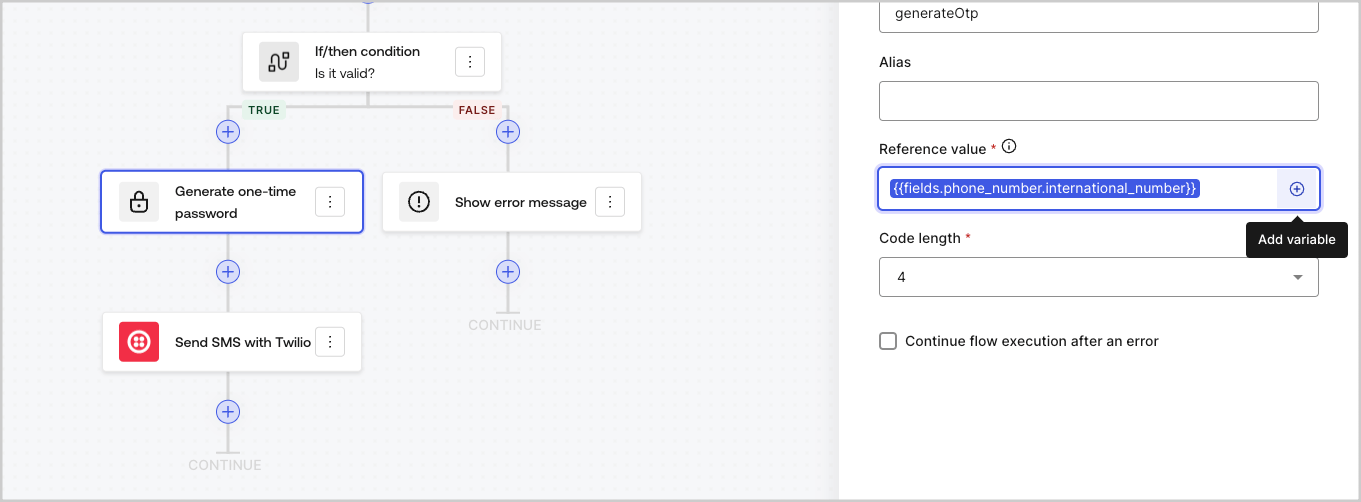
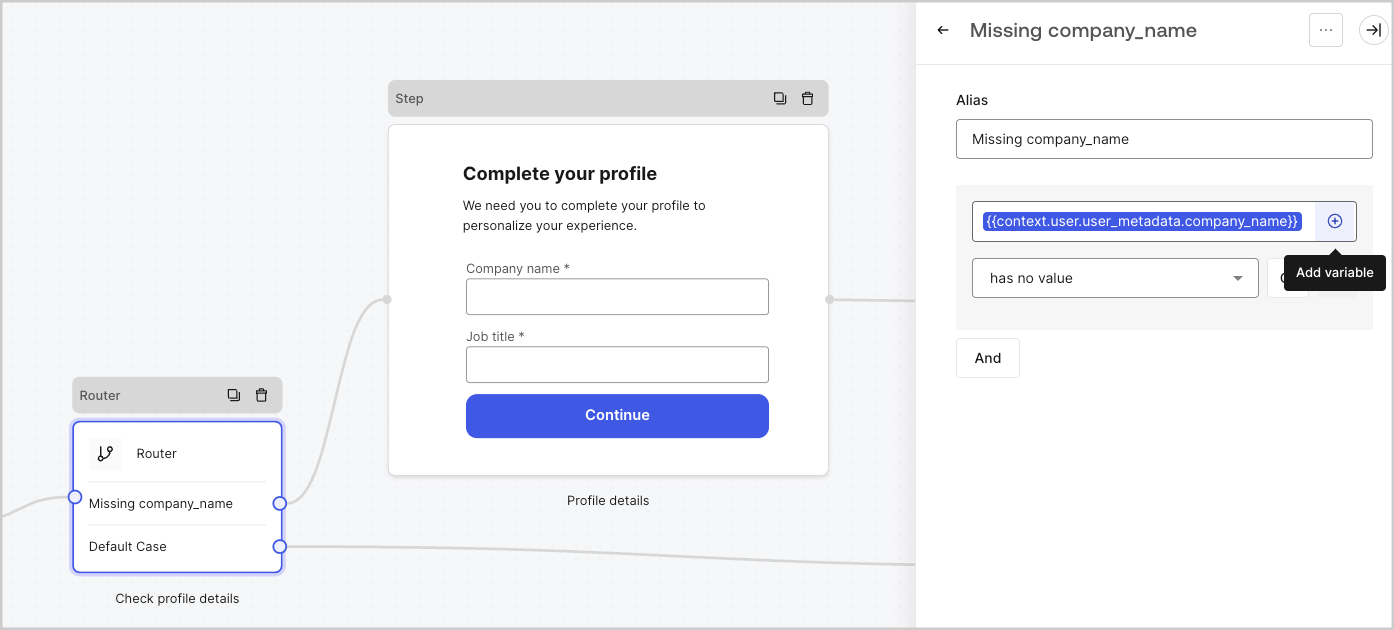
### Utiliser le menu de remplissage automatique

Le menu de remplissage automatique vous aide à localiser et à référencer correctement les variables existantes.
<Frame>
  <img src="https://mintcdn.com/docs-staging-update-unified-phone-experience-doc/xVmHC1blPjlyxfV2/docs/images/fr-ca/cdy7uua7fh8z/3SKnDuaMzSImxZtDDAoZaz/9ea800fad29ef71d1ded3c72b87660a4/Autocomplete-flows.png?fit=max&auto=format&n=xVmHC1blPjlyxfV2&q=85&s=7d6843b59553719b94e6e7aab8156731" alt="Dashboard > Actions > Forms > Flows" data-og-width="1361" width="1361" data-og-height="502" height="502" data-path="docs/images/fr-ca/cdy7uua7fh8z/3SKnDuaMzSImxZtDDAoZaz/9ea800fad29ef71d1ded3c72b87660a4/Autocomplete-flows.png" data-optimize="true" data-opv="3" srcset="https://mintcdn.com/docs-staging-update-unified-phone-experience-doc/xVmHC1blPjlyxfV2/docs/images/fr-ca/cdy7uua7fh8z/3SKnDuaMzSImxZtDDAoZaz/9ea800fad29ef71d1ded3c72b87660a4/Autocomplete-flows.png?w=280&fit=max&auto=format&n=xVmHC1blPjlyxfV2&q=85&s=a92b92f0e04efc9ae9933c1786cf4581 280w, https://mintcdn.com/docs-staging-update-unified-phone-experience-doc/xVmHC1blPjlyxfV2/docs/images/fr-ca/cdy7uua7fh8z/3SKnDuaMzSImxZtDDAoZaz/9ea800fad29ef71d1ded3c72b87660a4/Autocomplete-flows.png?w=560&fit=max&auto=format&n=xVmHC1blPjlyxfV2&q=85&s=6b6dcedde9a05644d6dec4e6a953eb2c 560w, https://mintcdn.com/docs-staging-update-unified-phone-experience-doc/xVmHC1blPjlyxfV2/docs/images/fr-ca/cdy7uua7fh8z/3SKnDuaMzSImxZtDDAoZaz/9ea800fad29ef71d1ded3c72b87660a4/Autocomplete-flows.png?w=840&fit=max&auto=format&n=xVmHC1blPjlyxfV2&q=85&s=4d7d901f30c7f2497a7c3e1150b876be 840w, https://mintcdn.com/docs-staging-update-unified-phone-experience-doc/xVmHC1blPjlyxfV2/docs/images/fr-ca/cdy7uua7fh8z/3SKnDuaMzSImxZtDDAoZaz/9ea800fad29ef71d1ded3c72b87660a4/Autocomplete-flows.png?w=1100&fit=max&auto=format&n=xVmHC1blPjlyxfV2&q=85&s=a7637cb29da35fb59a634dc087b435ed 1100w, https://mintcdn.com/docs-staging-update-unified-phone-experience-doc/xVmHC1blPjlyxfV2/docs/images/fr-ca/cdy7uua7fh8z/3SKnDuaMzSImxZtDDAoZaz/9ea800fad29ef71d1ded3c72b87660a4/Autocomplete-flows.png?w=1650&fit=max&auto=format&n=xVmHC1blPjlyxfV2&q=85&s=4aba39c2532928f5c7fdfed2418b4240 1650w, https://mintcdn.com/docs-staging-update-unified-phone-experience-doc/xVmHC1blPjlyxfV2/docs/images/fr-ca/cdy7uua7fh8z/3SKnDuaMzSImxZtDDAoZaz/9ea800fad29ef71d1ded3c72b87660a4/Autocomplete-flows.png?w=2500&fit=max&auto=format&n=xVmHC1blPjlyxfV2&q=85&s=c8bbe3106126ad6f4601ce5f0529c1f7 2500w" />
</Frame>

<Frame>
  <img src="https://mintcdn.com/docs-staging-update-unified-phone-experience-doc/xVmHC1blPjlyxfV2/docs/images/fr-ca/cdy7uua7fh8z/2kjRKozVgrd2a7UJXOANaN/ee5452d7210cd2f13b0e97763f11c82a/Autocomplete-forms.png?fit=max&auto=format&n=xVmHC1blPjlyxfV2&q=85&s=0e1996f40dec0bcdc05e15a28f8ee54d" alt="Dashboard > Actions > Forms > Form" data-og-width="1394" width="1394" data-og-height="630" height="630" data-path="docs/images/fr-ca/cdy7uua7fh8z/2kjRKozVgrd2a7UJXOANaN/ee5452d7210cd2f13b0e97763f11c82a/Autocomplete-forms.png" data-optimize="true" data-opv="3" srcset="https://mintcdn.com/docs-staging-update-unified-phone-experience-doc/xVmHC1blPjlyxfV2/docs/images/fr-ca/cdy7uua7fh8z/2kjRKozVgrd2a7UJXOANaN/ee5452d7210cd2f13b0e97763f11c82a/Autocomplete-forms.png?w=280&fit=max&auto=format&n=xVmHC1blPjlyxfV2&q=85&s=4ea4b44de98cdfd318ceb3b4709550de 280w, https://mintcdn.com/docs-staging-update-unified-phone-experience-doc/xVmHC1blPjlyxfV2/docs/images/fr-ca/cdy7uua7fh8z/2kjRKozVgrd2a7UJXOANaN/ee5452d7210cd2f13b0e97763f11c82a/Autocomplete-forms.png?w=560&fit=max&auto=format&n=xVmHC1blPjlyxfV2&q=85&s=9908fa2eb6d4ef76ae86c48d978474ca 560w, https://mintcdn.com/docs-staging-update-unified-phone-experience-doc/xVmHC1blPjlyxfV2/docs/images/fr-ca/cdy7uua7fh8z/2kjRKozVgrd2a7UJXOANaN/ee5452d7210cd2f13b0e97763f11c82a/Autocomplete-forms.png?w=840&fit=max&auto=format&n=xVmHC1blPjlyxfV2&q=85&s=6fb29fa95082aca1232e7fcc772b43a3 840w, https://mintcdn.com/docs-staging-update-unified-phone-experience-doc/xVmHC1blPjlyxfV2/docs/images/fr-ca/cdy7uua7fh8z/2kjRKozVgrd2a7UJXOANaN/ee5452d7210cd2f13b0e97763f11c82a/Autocomplete-forms.png?w=1100&fit=max&auto=format&n=xVmHC1blPjlyxfV2&q=85&s=1ed367cdfd084288887769ae61af9096 1100w, https://mintcdn.com/docs-staging-update-unified-phone-experience-doc/xVmHC1blPjlyxfV2/docs/images/fr-ca/cdy7uua7fh8z/2kjRKozVgrd2a7UJXOANaN/ee5452d7210cd2f13b0e97763f11c82a/Autocomplete-forms.png?w=1650&fit=max&auto=format&n=xVmHC1blPjlyxfV2&q=85&s=ba1259ba83b8e51988f0ccfefba96d5d 1650w, https://mintcdn.com/docs-staging-update-unified-phone-experience-doc/xVmHC1blPjlyxfV2/docs/images/fr-ca/cdy7uua7fh8z/2kjRKozVgrd2a7UJXOANaN/ee5452d7210cd2f13b0e97763f11c82a/Autocomplete-forms.png?w=2500&fit=max&auto=format&n=xVmHC1blPjlyxfV2&q=85&s=b51f0b6a88bde21f3248b1426cde1b84 2500w" />
</Frame>
